Industry 4.0 · UHF RFID

Every Job.
Every Station.

Where is job 4471 right now, and how long has it been sitting at machining? Identium’s RFID Manufacturing & WIP Tracking System puts a UHF read point at every station, so the shop floor reports itself — dwell time, bottlenecks, QC holds and finished-goods count, live, without anyone scanning a barcode.

On Floor
412
WIP jobs
QC Hold
3
Flagged now
Bottleneck
STN-02
41 min dwell
LiveStation-level WIP
0Manual scans
ERPMES / SAP sync
200°C+Tag options

Built for the Line, Not the Office

Barcodes fail on the shop floor because someone has to stop and scan. UHF RFID reads a job as it passes a station — through oil, dust and a metal jig. Here is what the system does at each point.

🏭

Hands-Free Station Reads

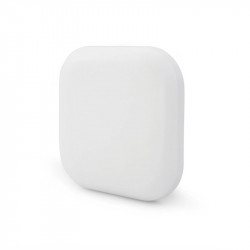
A fixed reader and panel antenna at each station log every job that arrives and leaves. No scanning step, no operator discipline required.

⏱️

Dwell Time & Bottlenecks

Time-in and time-out per station gives real dwell time. The dashboard shows where jobs pile up today, not in next month’s report.

🔥

Tags That Survive the Process

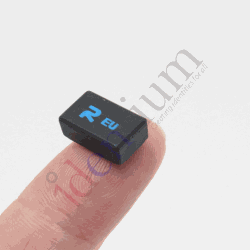
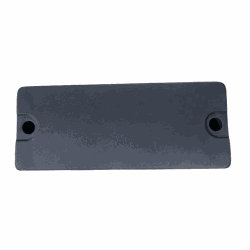
High-temperature ceramic tags through paint and ovens, on-metal Encore tags on jigs and castings, printable labels on cartons and bins.

QC Hold & Release

A hold at QC flags the job everywhere. Nothing moves to FG store until the release read clears it — the system enforces the gate.

🔄

Fixture & Tool Pairing

Read the job and the jig together and the system knows which fixture built which lot — traceability for audits and recalls.

📊

ERP / MES Integration

Station events push to SAP, Oracle or your MES via REST or middleware; batch reconciliation of counted vs. system WIP each shift.

Raw Store → Stations → QC → FG

Every job carries a UHF tag from issue to dispatch. Each station is a read point; the sequence of reads is the routing record. Dwell time and bottlenecks are arithmetic on those timestamps.

RAW STOREWIP TAGISSUEMACHININGWIP TAGSTN-02ASSEMBLYWIP TAGSTN-05QCWIP TAGPASS / HOLDFG STOREWIP TAGDISPATCH LIVE: 412 WIP jobs on floor · 3 held at QC · avg dwell STN-02 = 41 min

Four Steps to a Self-Reporting Floor

01
🏷️
Tag jobs, jigs & bins

Pick the tag by process: ceramic for heat, Encore for metal, labels for cartons. Bind each tag to a job or asset in the register.

02
📡
Instrument the stations

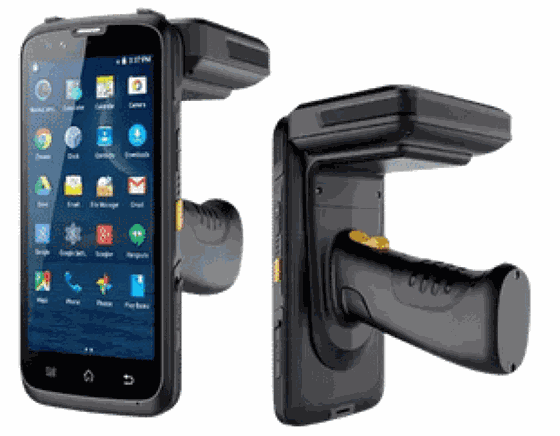
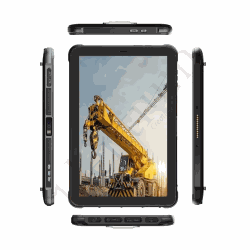
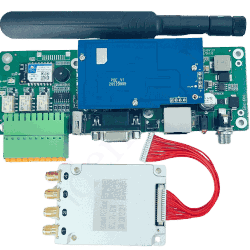
Fixed 4-port readers with panel antennas at high-volume stations; CX1500N handhelds and industrial tablets for audits and exceptions.

03
🔌
Connect to ERP / MES

Station events stream to your system of record; ReaderSense handles filtering, de-dup and zone logic so the ERP only sees clean movements.

04
📈
Run on the data

Live WIP by station, dwell heatmaps, QC hold reports, shift reconciliation. Chase the specific late job, not an average.

The Right Tag for the Right Process

On a shop floor the tag choice is decided by heat, metal and handling — not by software. Match tag to process first, then choose how each station reads.

TAG BY PROCESS Paint / oven / autoclave lineCERAMIC Metal jig / fixture / castingENCORE Carton / bin / travelling cardLABEL READ POINTS Fixed reader + panel antennahands-free at station CX1500N handheldaudits, exceptions Industrial tabletforklift / line-side

Recommended Products

Enterprise-grade UHF RFID hardware, sourced from our sister store IndiaRFIDStore.com.
WIP Tracking, Answered

What is RFID work-in-progress tracking?

Each job, bin or fixture carries a UHF RFID tag. Fixed readers at every station log the tag as it arrives and leaves, so the system knows where every job is, how long it has been there, and which route it followed — without operators scanning anything.

Will RFID tags survive paint, ovens and metal jigs?

Yes, if you pick the tag by process. Ceramic high-temperature tags handle paint lines and ovens; on-metal tags such as the Encore are designed to be mounted directly on steel jigs and castings; standard printable labels cover cartons and plastic bins. Identium specifies the tag per station during the pilot.

How does it integrate with SAP, Oracle or our MES?

Station events are pushed to your ERP or MES through REST or middleware, and a per-shift batch reconciles counted WIP against system WIP. ReaderSense filters stray reads and de-duplicates before anything reaches the ERP, so the system of record only sees clean movements.

Do we need a reader at every single station?

No. Start with the stations where jobs queue or where you lose visibility — typically issue, one or two bottleneck machines, QC and finished-goods. Handhelds cover the rest. Add fixed readers where the data proves it is worth it.

How is this different from a barcode travelling card?

A barcode only tells you where a job was the last time someone bothered to scan it. RFID reads automatically as the job passes, through dust and oil, in bulk, and pairs the job with its jig. The result is real dwell time instead of a self-reported one.

What is a realistic pilot?

One line, one to three read points, 200–500 tagged jobs, four weeks. Measure dwell time and QC hold accuracy against your current travelling-card data before scaling.

Know where every job is — without asking.

Pilot one line with two read points and a hundred tagged jobs. Compare the dwell data to your travelling cards after four weeks.