Introducing Identium ReaderSense: A Complete Platform for UHF RFID Readers
Every RFID deployment starts the same way: you unbox a reader, plug it in, and stare at it. Now what? You need to find its IP, get into a setup tool, tune the RF parameters against the actual tags you're using, verify every antenna fires, watch live reads to confirm coverage, then somehow stream the data to a backend. That journey — from "powered on" to "events flowing into production" — has been a fragmented mess of vendor utilities, Wireshark captures, hand-rolled scripts, and a lot of "it works on my machine."
Today we're releasing Identium ReaderSense: a unified desktop application plus a cloud platform that collapses that journey into minutes instead of days. It's built on a decade of RFID-deployment scar tissue, and it's free for any Identium customer.
What it does, in one sentence
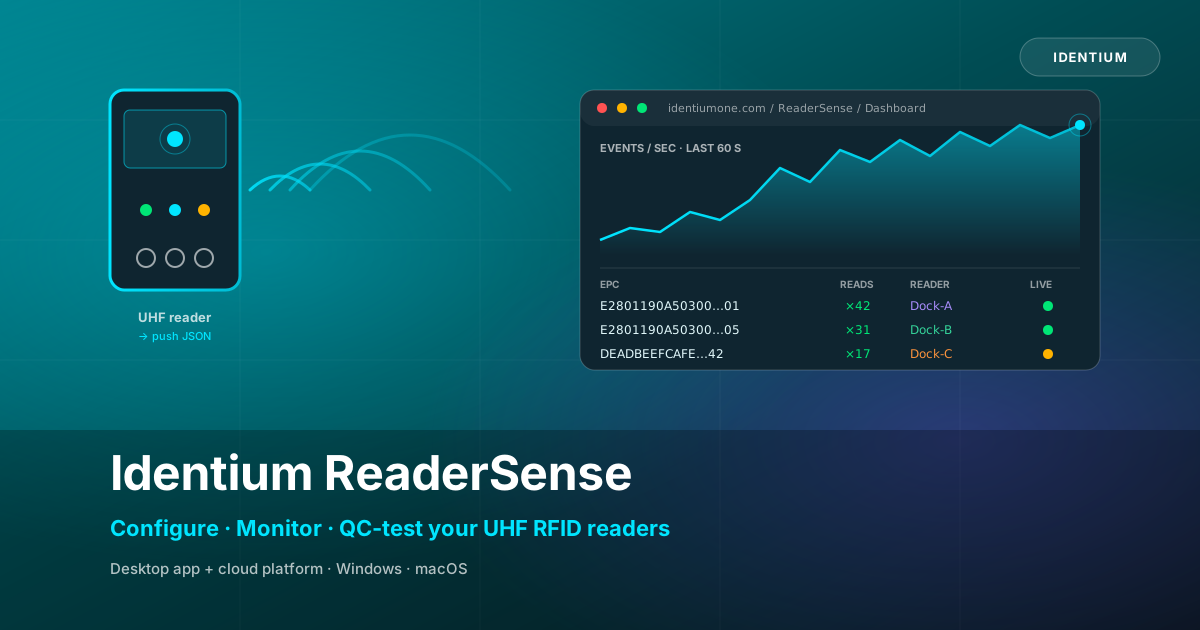
ReaderSense replaces a half-dozen tools you used to need with one application that connects, configures, AI-tunes, QC-tests, and streams live tag data to a multi-user web dashboard.
The two pieces, working together
ReaderSense ships as two components you can use independently or — for the full effect — together:
Desktop application
Windows + macOS. Sits on a laptop near the reader, talks to it over the local network. Where you connect, inventory, tune, QC-test, and put the reader into Auto Mode.
Cloud platform
identiumone.com/ReaderSense. Receives the JSON webhooks the reader pushes, visualises every event live, gives you per-reader analytics, QC verification, and team access.
The desktop application
Open ReaderSense, enter your reader's IP, click Connect. If you don't know the IP, the built-in Discovery tool sniffs your subnet and lists every reader it finds. From there:
Inventory and Settings
The Inventory tab streams tags in real time as the reader sees them — useful for verifying coverage, antenna placement, and tag orientation before you commit to a layout. The Settings tab exposes every parameter that affects RF performance:
- Per-antenna TX power · RX sensitivity
- Gen2 session · target · Q-value · Tari
- All 11 SDK RF profiles · every Impinj EX10 fast-mode
- Region / regulatory mode · power envelope
AISense — auto-tune for the tags you actually have
The newest piece is AISense. You describe your deployment (reader chip, antenna count, tag type, mounting surface, application, read distance), pick a depth, and AISense empirically tests candidate configurations against your actual reader and tags, measures every result, and tells you the winner with full data backing the choice.
This matters because RFID tuning is non-obvious: the "right" parameters for tags on a cardboard pallet are different from the same tags on a metal rack. Reading a manual or copying a colleague's settings gives you something that probably works. AISense gives you something measurably best — backed by the actual numbers from your reader.
QC module — production-line acceptance testing
Every reader we manufacture ships with a known set of capabilities, and the QC module is the same tool we use internally to verify each unit before it leaves the factory. It runs 17 tests across six categories:
Run the full suite or pick individual tests. The output is a PASS / CONDITIONAL / FAIL report with per-test detail — perfect for customer sign-off when a new reader is commissioned on-site.
Auto Mode — the bridge to the platform
Once the reader is tuned and verified, Auto Mode puts it into autonomous push mode. Pick your upload interface (LAN, Wi-Fi, or 4G), paste the webhook URL from the platform, hit Apply Configuration, then Start Auto Mode. The reader runs without the desktop app from that point on — even if the laptop goes home, the reader keeps pushing tag events to the platform.
The cloud platform
Open identiumone.com/ReaderSense, sign in, and the Dashboard greets you with your webhook URL prominently displayed and live stats counting up as your reader pushes data. The platform is built around three jobs operators actually do:
Watch tag traffic in real time
Live feed shows every webhook event as it arrives — parsed tag list on the left, raw JSON on the right, with per-event payload validation that explains anything off-spec.
Aggregate and analyse
Analytics turns the raw stream into useful pictures: throughput, tag discovery, gap distribution, per-reader breakdown, cross-reads, activity heatmap, connection-health timeline with dropout detection.
QC-test against a reference
Paste expected EPCs · platform shows matched / missing / unexpected in real time. Print a clean PASS / FAIL report for sign-off.
The platform was built as a SaaS from day one. Admins create user accounts, each user owns their own webhooks and saved sessions, and admins can see who did what via an append-only audit log. There's a system-health page for the platform itself, an API-token system for programmatic access, and public read-only share links so you can send a customer the result of a QC test without making them sign up.
Real-world scenarios this solves
🏷️ Warehouse commissioning
Tag a pallet with 50 known EPCs. Roll it through your portal. Open QC check with that list pasted in. You see 50 / 50 matched — or you see exactly which tags didn't read.
🌐 Multi-site monitoring
Readers at three customer sites push to the platform. Your ops team watches all three live, gets a banner when any reader goes silent, and spots the slow one on the heatmap.
🎯 Customer demos
Run a QC test in front of a prospect. Save it as "Pilot Demo — Acme — Jun 5". Hit Share. Send the URL to their CTO — they see the same data, no account needed.
🏭 Production-line QC
Every reader runs the QC module in our factory. The PASS report ships in the box. Customers re-run on arrival to verify nothing was damaged in transit.
What's under the hood
For the technically curious: the desktop app is an Electron + React + TypeScript shell over a small C# bridge that talks to ModuleAPI.dll (the vendor SDK). On macOS the bridge runs under Mono; on Windows it runs natively. The platform is a Node.js + SQLite back-end behind nginx with TLS, server-sent events for the live stream, bcrypt-hashed credentials, and Bearer-token authentication for the API.
Webhook payloads use the standard Identium shape (reader_name, event_type, event_data: [{ep, rc, lt}]), but the platform's validator accepts any sensible variant of event_type and any EPC encoding your reader sends — hex EPC-96, ASCII SGTIN-198, custom binary→string conversions. We don't second-guess the reader.
Security at a glance
bcrypt password hashing · HttpOnly + Secure session cookies · per-user data isolation · admin-only routes guarded · audit log of every meaningful action · API tokens hashed at rest, shown once at creation · SSRF guards on event forwarding · TLS everywhere except the reader-facing webhook (which is plain HTTP because RFID readers can't speak HTTPS).
How to get started
Sign in to the platform
Visit identiumone.com/ReaderSense. If you don't have an account, ask your administrator or reach us via the contact form.
Download the desktop app
From the platform's Downloads module — Windows installer, macOS Intel, and macOS Apple Silicon installers are all there with sha256 checksums.
Read the User Guide
Built into the platform's sidebar — walks you end-to-end from "install" to "tags streaming live" in about six minutes.
Plug in your reader
Connect, run AISense to tune, paste the webhook URL into Auto Mode, hit Start. Watch the Dashboard light up.
What's next
ReaderSense will keep evolving on a roughly monthly cadence. On the near roadmap: per-reader org-wide labels with location metadata, scheduled QC runs that alert when read rates drop below a threshold, two-factor authentication, deeper SGTIN decoding inside the tag drawer, and a webhook-bridge for customers who want their data forwarded to their own backend (already in there as a beta — see the Forward button in Webhooks).
If you're already running Identium readers in production, you can switch to ReaderSense in an afternoon and immediately get the visibility you've been missing. If you're evaluating UHF RFID for the first time, ReaderSense gives you a clean, modern way to actually see what the technology can do before you commit.